Thank you for visiting my blog!

Thank you for visiting my blog!

This blog is used to share information I find about the families I am researching. To see these family names click on the "My Families" tab. Please feel free to make comments, corrections, and ask questions here or on my Facebook page or go to the "About Me" tab to send an e-mail.

Reading this Blog

My posts can be accessed by the date posted from the column on the right. Blog posts containing specific surnames can be found by clicking on the names in the left column.

Line

Showing posts with label AI. Show all posts

Wednesday, June 3, 2026

Using AI to Give Names to the Tick Marks

John Ludovicus Reed, The Reed Genealogy: Descendants of William Reade of Weymouth, Massachusetts, from 1635–1902, page 115

When looking for family members before 1850, I often analyze earlier census records — the ones with only heads of household and tick marks. My goal is to determine who could have been living in the household during those years.

By giving names to the tick marks, I can track children over time, identify gaps, uncover possible missing family members, and estimate birth years.

This is not a new process for me.

In an earlier project, I compared the 1830 census for the Bryan family with birth information from the Bryan family Bible transcript. In that case, I was trying to see whether another child could fit into the household. The census did not name each person, but the age and gender categories gave me a way to test the family structure.


I have also used this approach with my John Giddens family in Wayne County, North Carolina. The 1800 census showed John Giddens with a wife, six sons, and two daughters. Comparing the census categories with the known or suspected children helped me see who fit, who did not, and where the gaps might matter.


Usually, I sort the household members into census categories by making a handwritten table, using a spreadsheet, or even writing notes on a printed copy of the census. But last week, I tried something different. I used AI to help me organize the comparisons. 

I was working with Benjamin Reed and his wife, Huldah Pratt, of Woodford, Bennington County, Vermont. One source that has been especially helpful is John Ludovicus Reed’s The Reed Genealogy: Descendants of William Reade of Weymouth, Massachusetts from 1635 to 1902. The clipped entry at the top of the page lists ten children for Benjamin Reed and Huldah Pratt.

That list was important to me because, until I found The Reed Genealogy, I did not know about four of the ten children named in the book. 

Of course, a published genealogy is not the final answer. It needs to be tested against other records whenever possible. For Benjamin Reed’s family, the 1790 and 1800 census records gave me one way to see whether the children named in The Reed Genealogy fit the household Benjamin Reed headed in Woodford, Vermont.

For these comparisons, my process was simple: I asked AI to check the Ancestry.com census transcriptions against the original images, use information found in The Reed Genealogy as a working family list, match likely household members to the census categories, and point out where the records fit or raised questions. In other words, AI was helping me follow the same process I use when I do this work by hand.

The 1790 census gave me my first test. Benjamin Reed’s household in Woodford included one male aged sixteen and over, three males under sixteen, and two females.

Most of that household fits the family described in The Reed Genealogy. Benjamin fits the adult male. Huldah Pratt Reed and her daughter Huldah fit as the two females. Several of the sons fit the male-under-sixteen category.

But there was one problem. Based on the children listed in The Reed Genealogy, I expected four males under sixteen: Benjamin Jr., John, Cyrus, and David. The census only counted three.

Table created with assistance from ChatGPT by comparing the 1790 census entry for Benjamin Reed with the family list in The Reed Genealogy. The comparison and conclusions were reviewed by the author.

That mismatch does not disprove the Reed genealogy entry. Census records are not perfect. A child may have been missed, be living elsewhere, or be temporarily away, or the household may have been reported or recorded incorrectly.

The 1800 census gave me a much cleaner comparison. By 1800, Benjamin Reed’s household in Woodford included nine people. When I compared those age categories with the children listed in the Reed genealogy, the younger children lined up very neatly.

Table created with assistance from ChatGPT by comparing the 1800 census entry for Benjamin Reed with the family list in The Reed Genealogy. The comparison and conclusions were reviewed by the author.

The two oldest sons, Benjamin Jr. and John, do not appear to be living in Benjamin Reed’s household in 1800, which makes sense, as they were about 19 or 20 years old.

The 1800 census does not prove the Reed genealogy entry on its own, but it fits the family group remarkably well. It also gives indirect support for family members who may not have left many records of their own. 

 AI did not prove that the published genealogy was correct. It did not replace the need to read the original census image. It did not solve the Reed family for me. However, it organized the information quickly. It helped calculate which children fit into each census category. It showed where the numbers matched and where they did not. What usually takes me well over an hour took only a few prompts. Both comparisons were useful, and AI saved me much time


If you would like to learn more about the families I research, follow my Facebook page, where I share each post and other genealogical finds.

Diana
© 2026

1790 U.S. census, Bennington County, Vermont, population schedule, Woodford, p. 244, Benjn Reed household; digital image, Ancestry.com, “1790 United States Federal Census” (https://www.ancestry.com/search/collections/5058/ : accessed 2 June 2026); citing First Census of the United States, 1790, NARA microfilm publication M637, National Archives, Washington, D.C.

1800 U.S. census, Bennington County, Vermont, population schedule, Woodford, Benjamin Reed household; digital image, Ancestry.com, “1800 United States Federal Census” (https://www.ancestry.com/search/collections/7590/ : accessed 2 June 2026); citing Second Census of the United States, 1800, NARA microfilm publication M32, National Archives, Washington, D.C.

1830 U.S. Census, Houston County, Georgia, population schedule, p.274, line 4, district or territory not named, Reddick Bryan; digital image, Ancestry.com (https://www.ancestry.com/: accessed 8 March 2021); citing National Archives microfilm publication M19, roll 18.

John Ludovicus Reed, The Reed Genealogy: Descendants of William Reade of Weymouth, Massachusetts, from 1635–1902, vol. 1 (1901); digital image, Internet Archive (https://archive.org/details/reedgenealogydes01reed/page/n11/mode/2up : accessed 18 April 2026).

"United States Census, 1800," database with images, FamilySearch (https://familysearch.org/ark:/61903/1:1:XHRD-ZJR : accessed 15 January 2022), John Giddens, Wayne, North Carolina, United States; citing p. 856, NARA microfilm publication M32, (Washington D.C.: National Archives and Records Administration, n.d.), roll 32; FHL microfilm 337,908.


Tuesday, May 12, 2026

AI Citations: Fast Drafts, Not Always the Finished Product


This AI-created citation got the place of death and the source completely wrong. I provided the screen clipping from Ancestry.com and URL, then asked for a citation in Evidence Explained style. This was the result:

Vermont, U.S., Vital Records, 1909–2008,” database with images, Ancestry (https://www.ancestry.com/search/collections/61834/records/218119 : accessed 8 May 2026), death record for Luther K. Rawson; citing Vermont Department of Health.


One of the places where AI has saved me the most time is with citations.

That may sound like a small thing, but citations can take a tremendous amount of time. Sometimes my source list on a blog post is longer than my post. Between census records, probate files, deeds, newspapers, cemetery records, family papers, digital images, and archive collections, a short post can still require a long list of careful source citations.

A page from my OneNote citation database
Before using AI, I had already created what I thought was a pretty efficient system. I kept citation examples and formats in OneNote, copied the closest match, and edited the details to fit the record I was using. Compared with building each citation from scratch, that felt like a real time saver.

And it was.

But AI has made the process even faster.

Now, instead of starting cold or hunting through my saved examples, I can give AI the information I have and ask it to help shape the citation. Often, it gets me very close very quickly. 

But there is an important “but.”

AI-generated citations still need to be checked. Carefully.

Sometimes the issue is small. I may want to change a word, adjust the format, or add a missing detail. Sometimes AI leaves a blank because I did not give it enough information, and that is fair. It cannot cite what I did not provide.

Other times, though, I have found glaring mistakes. The example at the top of the post is exactly why I check. AI identified the wrong database and placed the death in Vermont, even though the record was for a death in New Hampshire.

That has not made me stop using AI. I still love it for citations. It saves me a tremendous amount of time. But I treat every AI citation as a draft, not a finished product. A helpful draft. A fast draft. Sometimes even a very good draft. But still a draft.


If you would like to learn more about the families I research, follow my Facebook page, where I share each post along with other genealogical finds.

Diana
© 2026

ChatGPT, response to prompt requesting an Evidence Explained-style citation from a screen clipping and URL for Luther K. Rawson’s Ancestry death record, 8 May 2026; privately held by author.

“New Hampshire, U.S., Death Records, 1678–1974,” database with images, Ancestry (https://www.ancestry.com/search/collections/61834/records/218119 : accessed 8 May 2026), entry for Luther K. Rawson, died 8 January 1876, Croydon, Sullivan County, New Hampshire; citing New Hampshire Division of Archives & Records Management, Concord, New Hampshire, “New Hampshire Death Records, 1650–1969.”

Friday, November 21, 2025

Friday's Photo: My Grandmother's Photo was NOT Restored by AI


In June, I set out to repair a badly damaged photograph of my grandmother, Myrtie Hairston Bryan. I uploaded the image to ChatGPT and asked it to restore the photo without altering the original coloring or her facial features. The result looked promising, and feeling satisfied, I labeled it “restored” and proudly shared it on my blog. My enthusiasm had been sparked after listening to Episode 25 of The Family History AI Show with Mark Thompson and Steve Little—though, in hindsight, I clearly missed an important point.

Restoration or Reconstruction? 

When I first ran my grandmother’s photo through Artificial Intelligence (AI), I thought I was seeing a careful repair job. The scratches and spots vanished, and her face appeared smoother and clearer than before. Only later did I realize the AI hadn’t really fixed the original image at all—it had recreated it.

AI studied the damaged image and generated new pixels to replace the missing details. The end result certainly looked like my grandmother, but it wasn’t the same photograph she carried home from the studio in the early 1900s. It was a modern, computer-generated version of that moment.

This difference matters. Just as we distinguish between an exact transcription and a “cleaned up” version of a document, we should be clear about whether a picture shows original evidence or an interpretation.

When we use AI to “improve” old photographs—whether by sharpening, recoloring, or filling in missing areas—we’re creating a new version. Those images should be clearly labeled, and the unaltered scan should always remain the authoritative copy. 

Moving Forward with AI 

I have removed the June 20th post because I don’t want someone to see that recreated image and upload it as a true restoration to sites such as Ancestry, where it would be copied and shared repeatedly.

I still appreciate what AI can do. It’s a tool I use daily for a wide range of tasks, including genealogy. However, when it comes to photographs, I’ll be much more cautious and look forward to the day when AI can truly repair a historical image rather than rebuild it.

My thinking about AI and photos has been shaped in part by conversations in the genealogy community—especially discussions from The Family History AI Show with Mark Thompson and Steve Little.

If you want to know more about the families I research, click here to like my Facebook page, where you will see each post and other genealogical finds. 

Diana

© 2025

Sources

“Episode 25: AI Image Generation Advances,” The Family History AI Show, (https://podcasts.apple.com/us/podcast/ep25-chatgpt-4o-transforms-image-generation-jarrett/id1749873836?i=1000712214261accessed 21 October 2025).

“Episode 27: Restoration or Recreation?” The Family History AI Show, (https://podcasts.apple.com/us/podcast/ep27-ai-image-restoration-concerns-perplexitys-future/id1749873836?i=1000717145783: accessed 21 October 2025).

Tuesday, April 22, 2025

Buster vs. Dad – An AI Perspective

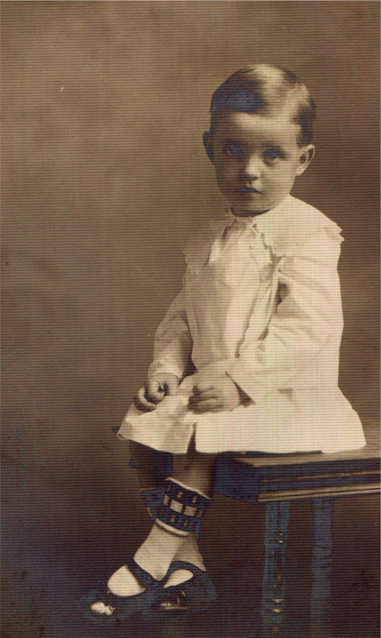
Buster and Dad in their early teens. 

I decided to use AI to help identify some of my unknown family photos. The first few results weren’t great—a boy was labeled as a girl, another as a man, a scratch was mistaken for a clothesline, and an attempt to create a collage ended with images that didn’t look like my family at all. 
But when I started using OpenAI’s ChatGPT to compare photos side by side, I finally began to get useful results.

Buster or Dad?

I have several children in photos that have always been in question—were they my father or his brother? My cousin, who originally had the photo collection, labeled all of them as “Buster.” Buster was my dad’s older brother, Hairston Albritton Bryan, born in 1906. My father, Whit Criswell Bryan, was born in 1920. While I’d already guessed that some of the photos were of Dad, there was always a bit of doubt. AI helped confirm what I’d suspected.

I started by uploading one of the questionable photos and simply asked, “Can you date this?”


AI responded with an analysis of the child’s clothing, shoes, and the overall photographic style—pointing out the sepia tone and the formal studio setup. Based on these features, the photo was dated to somewhere between 1910 and 1920.

I followed up with: “This has been identified as my Uncle Buster, who was born in 1906, but could it actually be my father, born in 1920?”

The response was clear:
“While it could be your father, the styling strongly favors your Uncle Buster (born 1906). Everything about the child’s appearance, the clothing, and the studio portrait setup points to the 1910–1912 range.”

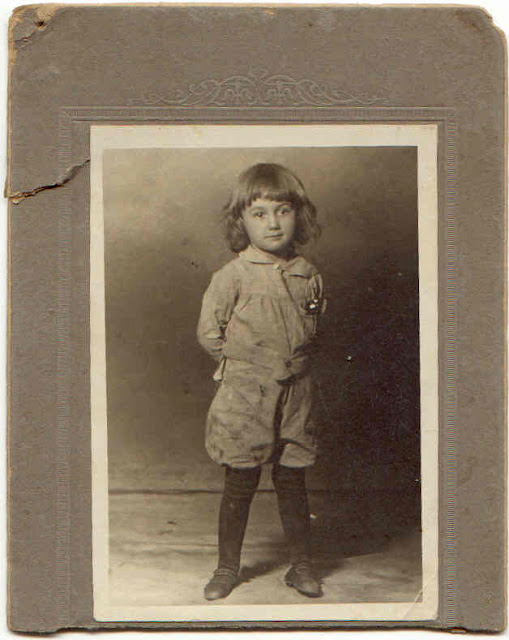
I decided to go a step further. I uploaded another photo and asked, “Could this be the same child?”


AI responded by analyzing the clothing, backdrop, and photo mount, estimating a time frame of circa 1910-1912, which lines up closely with Buster’s childhood years.

It noted that both children had oval-shaped faces, strong jawlines, and similar eye placement and spacing. The resemblance was plausible, especially when considering age progression, fashion trends, and the photographic style. If the child in both photos was Buster, the timeline worked.


Next, I shared teen photos of Buster to see if there was a visible connection. AI noted strong continuity in features—especially eye shape, nose, and jawline—linking the child in the earlier photos to the teen in the later ones.

I added this photo and asked, “What do you think of this photo of my father—Buster’s younger brother, born in 1920? My cousin said it was Buster, but I know it’s Dad.” 


AI responded with, "The boy is dressed in a classic sailor suit with a wide collar and checkered tie, a style popular from 1915 to the early 1930s. His dark stockings and leather shoes complete the look. His straight, bowl-style haircut with a trimmed fringe was typical for boys in the early 1920s, especially before school age. Based on these details, the image likely dates to around 1923–1925, which fits perfectly for your father, born in 1920."


So I shared three known childhood photos of my father, and AI came back with, "These known photos of your father clearly show a consistent progression from babyhood to adolescence, with strong physical matches to the sailor-suit portrait. Between the features and the timeline, it’s very safe to say the child in the sailor suit is your father—not Buster."

I shared three more photos, thought to be of Dad or Buster, and received the expected results.  

Dad - Whit Criswell Bryan


Buster's Baby Photo
Dad on a Donkey


Comparing Tools and Doing My Own Research

All of the photo analysis and comparisons in this article were generated using OpenAI’s ChatGPT. I also tried Anthropic’s Claude. Claude was more cautious. It provided similar comparisons of facial features and timelines, but was less willing to commit—recommending a second look and suggesting I talk to family members

And while ChatGPT provided useful insights, I didn’t accept everything without question. I did my own research to confirm the clothing and hairstyle information, especially since sources weren’t cited. After conducting my own research, I generally agreed with ChatGPT’s timelines for hairstyles and clothing; however, the sources I found indicated that these trends didn’t follow strict cutoffs—there was more overlap and variation than the AI responses suggested.

Final Thoughts

This process was a good reminder of the value of revisiting old photos with new tools and a fresh perspective. AI won’t solve every mystery, but in this case, it helped me ask better questions and, more importantly, confirm what I’d long suspected.

If you want to know more about the families I research, click here to like my Facebook page, where you will see each post and other genealogical finds. 

Diana

© 2025

Sources

Edward Zapletal, Publisher and Editor, More Dating Old Photographs 1840-1929 (Toronto: Moorshead Publishing, 2011).

Historic Boys' Clothing, "United States Sailor Suits: The 1920s," web page, Historic Boys' Clothing (https://histclo.com/style/suit/sailor/sailorus20.html : accessed 22 April 2025).

Jo B. Paoletti, “Clothing and Gender in America: Children’s Fashions, 1890-1920.” Signs 13, no. 1 (1987): 136–43 (http://www.jstor.org/stable/3174031: accessed 14 April 2025). 

Maryanne Dolan, Vintage Clothing 1880-1980 (Alabama: Books Americana Inc., 1995).  

Special Collections at the Richardson-Sloane Special Collections Center, "Saluting the Sailor Suit," blog entry, 2 July 2022, Primary Selections from Special Collections, blog (https://blogs.davenportlibrary.com/sc/2022/07/02/saluting-the-sailor-suit/ : accessed 22 April 2025).

TPR, "The Bowl Haircut," blog entry, 2 January 2020, The Past Recedes, blog (https://tpr76797.wordpress.com/2020/01/02/the-bowl-haircut/ : accessed 22 April 2025).


Tuesday, February 11, 2025

My Disclosure: AI is my Writing Assistant


For the last 14 years of my career, I worked in an office where writing was a key part of my job. I regularly prepared evaluation reports and communication plans for children with physical disabilities and other challenges that significantly impacted their communication abilities.

I collaborated closely with three other speech-language pathologists. Together, we critiqued and proofread each other’s reports, relying on free grammar-checking tools and Google searches to refine vocabulary and verify grammar rules. Our process was thorough. We discussed each report, offering suggestions for revisions and improvements. While I had the final say, my reports were never just my own; they represented a collaborative effort enriched by the team's insights and expertise.

  
A New Kind of Collaboration: My AI Disclosure

Now retired, I still write often. While I no longer need rigorous critiques, I still appreciate a second set of eyes before publishing. I’ve found the paid version of Grammarly helpful, but over the past year, I’ve turned to Artificial Intelligence (AI) for assistance—not just with grammar but also with refining content and improving overall readability. This has significantly sped up my writing process. 


AI has taken the place of my three coworkers, offering suggestions and refinements much like they once did. But the core remains the same—these are still my ideas and words, just with a little extra help along the way.

I added a full disclosure statement about my use of AI to my blog. You can read it in the Disclosures tab, where I explain how AI supports my writing process.


Posts Featuring AI


If you want to know more about the families I research, click here to like my Facebook page, where you will see each post and other genealogical finds. 

Diana

© 2025

"Writing Assistant,"AI-Generated Image, created by DALL·E via ChatGPT, October 2024; digital image, privately held by Diana Quinn, Virginia Beach, 2024.

Thursday, October 10, 2024

My Week with AI: Podcasts, a PowerPoint, and a Timeline

Finding photos for my blog and presentations is much easier with AI. Simply imagine and
describe your photo. I asked Meta AI to create a fall scene with someone raking and
listening to a podcast


Two weeks ago, I posted My Week with AI: Citations, YouTube, eBay, a Will Transcription, and a Spreadsheet. That was my first post about AI, and I plan to share something I’ve done with AI at least monthly. I learn something new every time I use it, and this past week has been no different. Here are a few of my AI learning experiences from the past week.


Podcasts

My yard chores often translate into listening to podcasts and audiobooks. I always look forward to and often replay two genealogy podcasts: The Family History AI Show with Steve Little and Mark Thompson and Research Like a Pro Genealogy Podcast with Diana Elder and Nicole Dyer. Diana and Nicole have integrated AI into many of their recent episodes, while Steve and Mark's podcast focuses entirely on AI's role in genealogy. These aren't the only genealogy podcasts I listen to—there are plenty of great options. If you want to listen to genealogy podcasts, check out the Genealogy Podcasts page at ConferenceKeeper.org for many wonderful choices.

PowerPoint

I have a 60-minute how-to presentation on FamilySearch that I need to trim down to 30 minutes for one of my local genealogical society's activities. I decided to try Perplexity, a new-to-me AI platform, to help with the task. It gave me useful suggestions, including what to put on each slide and how long to spend on them. But when I asked it to create the slides, I was told it couldn't.

Just for fun, I tried the same prompts in ChatGPT. The results were similar, but ChatGPT actually created slides. However, after opening the PowerPoint from ChatGPT, I found that it consisted of only one slide with just a little text. 

Determined not to give up, I tried a different approach—I asked ChatGPT to create slides based on its own suggestions. The results were quite amusing. I had forgotten how much ChatGPT struggles to spell words on images.


I will definitely be creating my own PowerPoint slides!


A Timeline

I am a firm believer in timelines. I've been working hard on my Plymouth, Massachusetts, Reed family and created two timelines in Word documents for this family. I asked ChatGPT to extract the information from both documents and add it to an Excel spreadsheet with columns for dates, events, locations, and notes. 

I now have a nice readable Excel document, but it wasn't a quick process—it took over an hour to analyze the information. The first spreadsheet only captured 27 out of the 87 items from the timelines. I felt like I was constantly nagging ChatGPT to add or adjust entries. In the end, however, ChatGPT put together a more user-friendly document in less time than if I had done it manually.


AI may not always get everything right, but it’s helping me streamline my research and uncover new possibilities. Give it a try—it just might surprise you! 


If you want to know more about the families I research, click here to like my Facebook page. There, you will see each post and other genealogical finds. 

Diana

© 2024 

ChatGPT, "Essential FamilySearch Resources," Slide Illustrations, OpenAI DALL·E, October 10, 2024.

Meta AI, "Fall Picture with iPod," Digital Artwork, October 9, 2024. Artificially generated image of a fall scene.

Tuesday, September 24, 2024

My Week with AI: Citations, YouTube, eBay, a Will Transcription, and a Spreadsheet

The will of John Reed, my 6th great-grandfather. 

Reviewing my recent ChatGPT activity, I was surprised by how much my AI usage has grown. Last week, I used ChatGPT more than I have in any entire month this year—and that’s not even including my time on other platforms. While ChatGPT is my go-to for AI (I have a paid subscription), I'm slowly getting familiar with others. So far, I have experimented with Co-Pilot, Claude, Meta AI, and Gemini. I’m definitely a beginner, but I’m really enjoying the experience! Here are a few of my successes this week.

Citations

I wrote a newsletter article that needed citations outside my usual templates. Normally, I’d spend time researching the correct format, but ChatGPT generated them quickly, saving me the effort. Although the citations needed some tweaking, I can clearly see that, in the future, citations will be easier to create with AI. 
YouTube

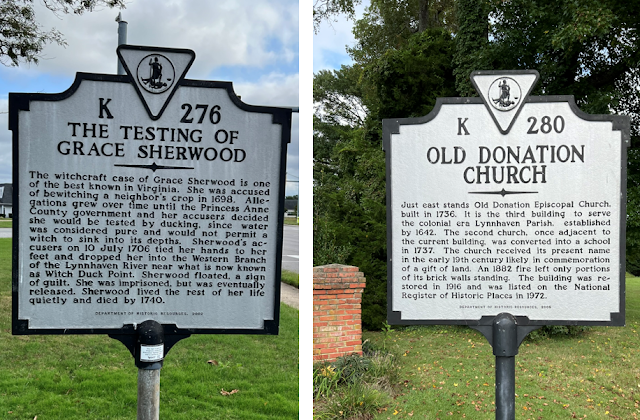
 While writing about the Virginia Highway Markers program, I wanted details about local programs. The only source was a 90-minute YouTube video, which I knew would tell me more than I wanted to know. Instead of watching the video, I uploaded the video transcript to ChatGPT. It summarized the key points with an offer to expand on any section. A quick follow-up provided the required information. The total time for this task was approximately 15 minutes. 

Two interesting Highway Markers in my neighborhood

eBay

Since retiring, I’ve been downsizing and frequently selling on Marketplace and eBay. I wasn't sure how to describe this vintage chocolate mold I wanted to sell on eBay. I submitted a photo to ChatGPT and received a perfect description.

A Will Transcription

John Reed's will, at the top of this post, was found using FamilySearch’s full-text search. Like many other documents found with Full-text search, a not-so-easy-to-follow transcription is included. I asked ChatGPT to rewrite the transcription for clarity without altering the text, and in seconds, I had an easy-to-read version. However, I still need to cross-check it against the original for accuracy. 

A Spreadsheet

I wanted a spreadsheet to track attendance for the special interest groups in my local genealogical society. While I could have built the spreadsheet myself, it would have taken me an hour or more since Excel isn’t my strong suit. With ChatGPT’s help, I had a fully functional spreadsheet with drop-down menus in under five minutes.

This Excel spreadsheet includes drop-down menus for the Group Name, Month, Day, and Year.

AI tools are proving to be great time savers. 
I look forward to learning more and uncovering new uses for these tools daily.


AI Tools Named in this Post

ChatGPT (Open AI) 

Claude (Anthropic) 

CoPilot (Microsoft) 

Gemini (Google) 


If you want to know about the families I research, click here to like my Facebook page, where you will see each post and other genealogical finds. 

Diana

© 2024 


"Plymouth, Massachusetts, United States records," Supreme Judicial Court, 1739, 
digital images, FamilySearch (https://
www.familysearch.org/ark:/61903/3:1:33S7-9RYS-4CR?view=fullText : accessed 18 September 2024), image 1156 of 1409, Will of John Reed.

Virginia Highway Markers and Chocolate Mold, photographs, 2024; private collection of Diana Quinn, Virginia Beach, VA, 2024.